
An OEM snapback tech pack connects the design to the sample that will control production. It gives the sample team a current reference for materials, construction, measurements, artwork and packing. Without those connections, a revised logo can be paired with an old material list, or a fit comment can be lost between sample versions.
If the project is still at the idea stage, start with the custom snapback design brief. Use the technical file below once the main choices are ready to be defined and tracked in more detail.
Give the file a style code and a revision
Put the style code, revision date and sample reference on the cover and relevant pages. Include a short change summary so the recipient can see what has changed. If several colorways share the same construction, identify the shared pages and keep the colorway-specific details separate.
A useful file can be a coordinated spreadsheet and PDF rather than an elaborate design system. What matters is that the team can identify the active version, find the related artwork and distinguish confirmed instructions from open decisions.
Build a bill of materials with usable references
List the outer fabric, front support, visor components, sweatband, closure, eyelets, button, tape and labels that apply to the cap. Record the proposed material reference, color and relevant specification for each. Where a supplier is still proposing alternatives, mark that status rather than presenting an unapproved material as final.
Connect physical swatches or trim examples to the list with matching reference codes. “Black fabric” cannot distinguish several black materials with different weights or finishes. If a material changes, identify the affected colorways and which sample checks need to be repeated.
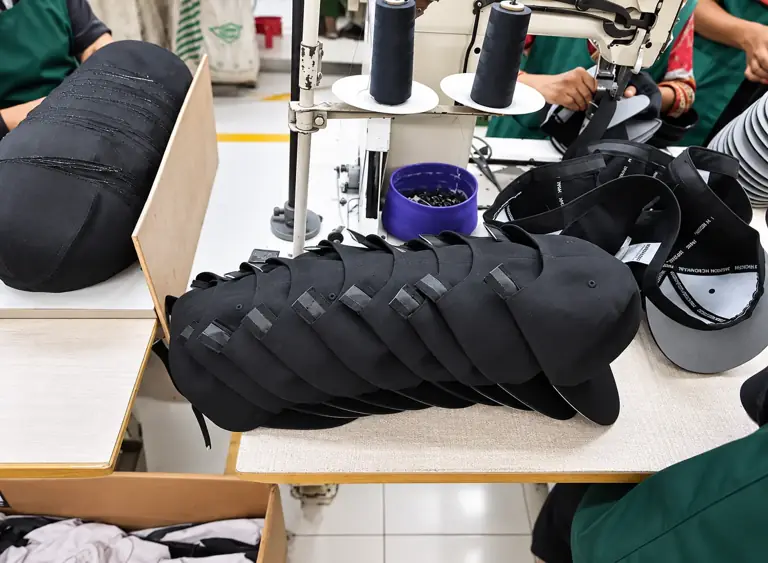
Show construction instead of relying on style terms
Include marked front, side, rear and inside views. Identify panel seams, reinforcement, the rear opening and closure attachments. State the visor profile and any contrasting underside or stitch arrangement. Separate visible appearance from the construction detail needed to achieve it.
For a reference to common terminology, New Era’s silhouette guide describes crown support, panel count and closure within its own styles. Those examples can help explain terms; your OEM specification still needs its own agreed references and measurements.
Define how each measurement is taken
Use a marked sketch or photograph for each important measurement. Name the start and end points, unit and cap condition. A straight distance and a tape measurement following a curved seam are different methods, even when they describe a similar part of the crown.
Record the agreed target and tolerance for the order. For the adjustment range, state the closure positions or checking method that apply. Review the snapback crown profile comparison guide when defining depth and front shape; a high-profile label is not a complete measurement specification.
Keep the technical file organized by decision
| Section | Reference to include |
|---|---|
| Style and revision | Style code, current version, sample reference and change summary. |
| Material list | Component codes, proposed or approved materials, colors and swatches. |
| Construction views | Panel layout, reinforcement, visor, rear opening and attachment details. |
| Measurements | Marked points, method, units and agreed targets and tolerances. |
| Artwork schedule | File revision, finished dimensions, position and decoration method. |
| Trims and packing | Label references, item data, individual packing and carton instructions. |
| Approval record | Accepted details, open changes, responsible approver and final production reference. |
Link artwork to the right construction and colorway
Keep the original artwork and a readable preview, with the same revision name used in the schedule. Show finished dimensions and placement against defined points on the cap. Identify which decoration applies to each colorway, including any thread, patch or print-color changes.
A decoration trial should represent the intended material and construction. If a crown seam, fabric or reinforcement changes, review whether the accepted logo result still applies. Do not let an approved artwork file stand in for approval of an unseen stitched or attached result.
Connect trims and packing to the same item codes
Use the same style and colorway codes across the material list, artwork schedule and packing instructions. Include buyer-approved label wording and identifier data rather than copying another product’s information. Keep a trim register where inside branding or retail requirements have several versions.
The private label snapback guide covers that register in more detail. Confirm the proposed carton assortment and the references that distinguish similar versions during receiving.
Record sample comments as changes to the file
Give comments a sample revision, location and instruction. Separate accepted details from requested changes. If the fit is accepted but the closure color is not, preserve the fit approval while updating the material or trim reference that remains open.
Before bulk approval, identify one controlling sample and the matching technical-file revision. Keep superseded files out of the active instruction set or clearly mark them. Ask the supplier to confirm which version has been received, and review whether later changes affect the quoted scope and timing.
Frequently asked questions
Does an OEM order require a particular software format?
Agree a format the sample team can use. A clear spreadsheet, marked PDF and organized artwork folder can work when their codes and revisions remain consistent.
Who should set the measurement tolerances?
The buyer and supplier should agree them for the intended construction and checking method. Record that agreement in the current file rather than copying unrelated values from another cap.
Can a new colorway use the previous approved sample?
It may share approved construction, but different materials, trims or decoration colors can still require review. State what the earlier sample represents and what needs separate approval.
Review your OEM snapback specification
Use the Snapback Cap Buying Guide and main snapback cap product page, then send Wenext Caps your current technical file. Include the reference sample, quantity split and open decisions so the review can focus on the actual order.