
A private-label six-panel cap can carry the brand in several places: across the front, beside a panel seam, above the rear opening and inside the crown. Those locations need a coordinated plan. A clear front-logo approval can still leave the inside label, tape orientation or rear mark unresolved.
Prepare a branding map for the complete cap. The 6-Panel Cap Buying Guide covers the broader construction brief. This article focuses on connecting each private-label component to a location, file and assembled sample.
Map the outside marks to the chosen construction
Show the front artwork relative to the centre seam and visor. Mark any side-panel logo, rear text, strap branding or underside detail separately. Give each mark its finished dimensions and intended method so the supplier can identify what belongs at each location.
A generic cap mockup may leave the panel layout unclear. Use the selected six-panel views and keep the location references consistent with the construction sheet. If the crown or rear opening changes during development, check the affected branding positions again.
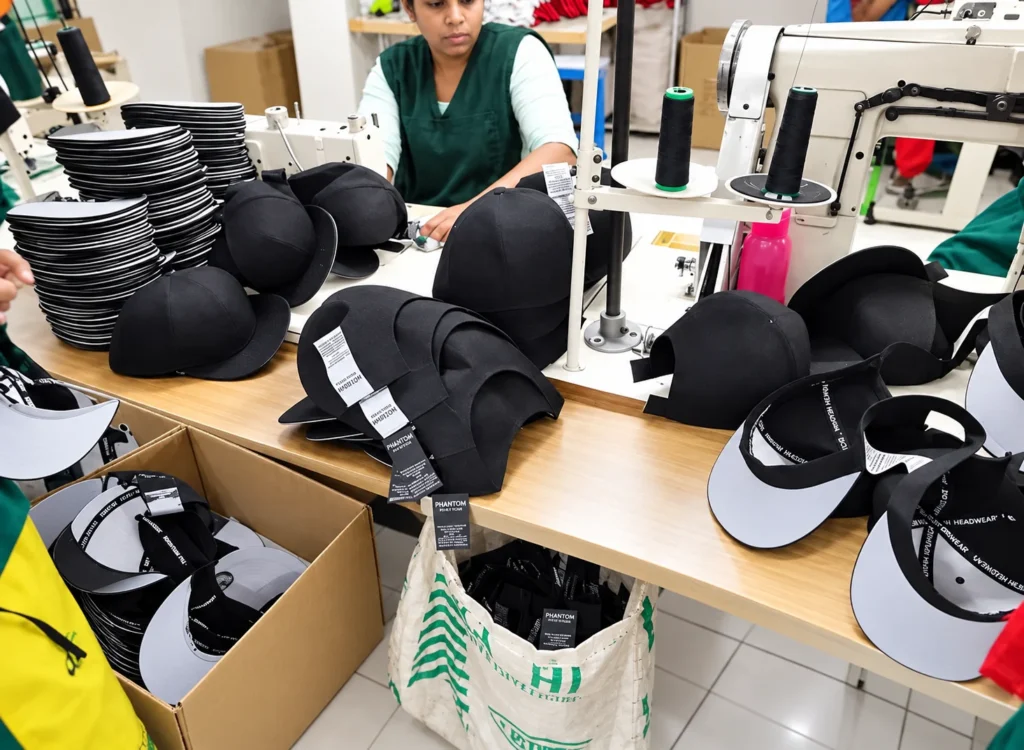
Review inside branding on an assembled cap
Identify the main brand label, size indication, product-information labels and any printed or woven inside details. Show where they sit relative to the sweatband and seam treatment. Review the resulting placement on the sample rather than approving only the loose component artwork.
Record which labels are intended to be present when the cap reaches the buyer. Label arrangements differ between products. For example, AS Colour lists a tear-out brand label on its Icon Cap. That is a feature of its own product; specify the required label arrangement for the actual Wenext programme.
Check the inside locations with the cap in the agreed wearing setup. If a label, attachment or component changes, identify the points that need another review. Keep the approved dimensions and placement with the sample record.
Give branded seam tape a readable orientation
If custom tape forms part of the concept, provide its artwork and mark the intended orientation in the crown. Identify the reference point used to read the design. A repeating logo can be approved as artwork while leaving its direction on the finished cap open.
Review the complete inside presentation where the panel seams meet and where tape meets the band or other components. A photograph of a loose tape length answers a different question from the assembled inside view. Record the accepted result using the relevant cap and file versions.
Keep rear branding connected to the fastening
A rear mark may be placed above the opening, on the strap or on a selected trim. Show the intended location with the actual fastening arrangement. Identify the adjustment setting used in the approval photographs where it affects the visible result.
If the strap, buckle or closure type changes, review its relationship to the branding. The same rear artwork can sit differently on another arrangement. Mark whether the artwork, location or both need revision.
Connect the component list to each item
A range may share the same main brand label while using different logo colours, size labels or tags. Give those variations an item reference. Keep the front artwork, inside components and retail presentation tied to the same version.
- Location: marked outside or inside view of the selected cap.
- Component: the label, tape, logo, tag or packing item requested.
- File: approved artwork revision, dimensions and colours.
- Application: method, attachment or supplied presentation to review.
- Scope: the colourways, sizes or other items using that version.
- Decision: accepted sample reference and any outstanding condition.
Identify who supplies and approves product information for the destination. When the material, size system or item data changes, check the affected files before release. Visual approval of a label layout should remain connected to the correct wording and item identity.
Review the cap with its retail components
Put the proposed labels, hangtag, sticker and packing arrangement together with the cap. Check that each component identifies the right item and uses the released artwork. Review the presentation after unpacking where that forms part of the approval.
The six-panel sample planning checklist helps keep temporary components visible during development. A provisional tag can demonstrate a location while leaving the final tag file or material awaiting approval.
Release one complete branding version
When a file changes, identify its replacement and the items affected. Ask which work has started before assuming the revision can be applied to every prepared component. Keep the decision about existing materials with the new release.
Discuss the branding map through the Wenext six-panel cap product page. Send the marked views, component files and open questions through Contact Wenext Caps so the complete private-label arrangement can be reviewed.