
Private label dad hats need an approved trim package that production can identify and use. A brand label, seam tape or hangtag may look simple, but a late artwork change can affect several item versions. The practical task is to connect the accepted physical component, its artwork and the quantities required for the order.
Use the Custom Dad Hat Buying Guide for the complete cap specification and the dad hat product page for a project enquiry. This checklist focuses on approving trims and releasing the correct versions for production.
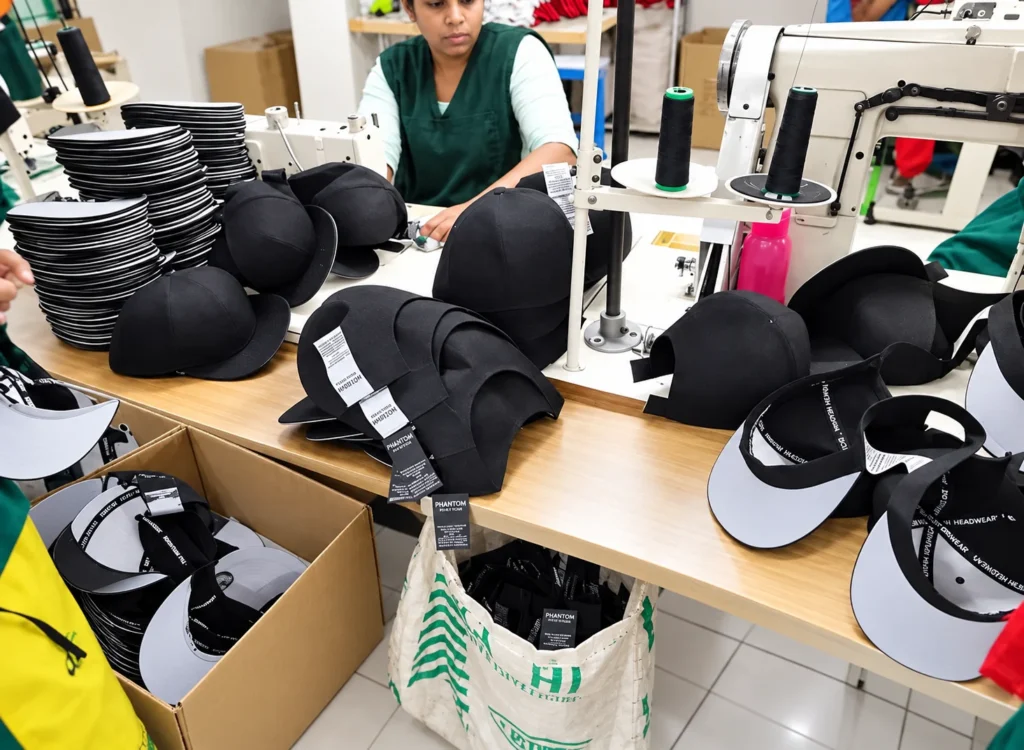
Give each trim a component reference
List every required component: brand label, information label, seam tape, side tab, hangtag, sticker or other specified item. Record the component reference, artwork revision, dimensions, material direction and intended location. Identify any component shared across several cap items.
Keep a trim specification separate from a mood board. A reference photograph may explain the desired feel or placement, but it does not establish the final text, size or material. Ask the responsible party to close those details before the component is treated as ready for production.
Approve the artwork and physical component separately
The artwork proof should show the complete graphic and text at the intended dimensions. Check spelling, proportions, color references and any item-specific information. Have the responsible buyer or specialist approve required product wording for the intended market.
Review a physical component where it is needed to assess the actual result. A large screen proof does not show every aspect of small text, folded edges, material feel or attachment allowance. Keep the accepted physical reference linked to the same artwork revision.
Pantone’s physical-sample guidance explains the role of physical color references in its workflow. Agree how the chosen trim’s actual color and material will be assessed; a screen preview should not silently become the only precise color reference.
Review the component on the cap
Show the label or tab in its intended position on an assembled sample. Check its orientation, legibility and attachment, along with the surrounding construction. For inside components, review the contact area and the way the component sits with the sweatband or seam.
A separately approved label is not yet approval of every possible placement. If the location changes, identify the revised position and ask whether another sample check is required. Keep the front logo application in its own specification using the custom logo dad hat brief.
Map trim versions to the item list
Connect each cap colorway and other relevant variation to its required trim package. Some components may be common, while others contain a different item code, color or product description. Make those exceptions visible in the release list.
For a washed style, the retail file checklist covers identifiers and the relationship between label timing and the finish. Do not extend one component’s approval to a different material or processing sequence without reviewing the actual proposal.
Confirm the quantity basis before ordering trims
Start with the number of finished caps by item, then identify the required use of each component. Ask the supplier to show any proposed additional quantity, component minimum or handling allowance separately. Agree responsibility for buyer-supplied trims and the treatment of unused components.
A shared trim order and the finished cap order may have different quantity assumptions. Keep the distinction visible instead of treating every extra label as an extra finished cap. If the item split changes, review the affected component requirements before the release is updated.
Release a dated package of approved files
- List the final component and artwork references.
- Name the physical samples or proofs that support approval.
- Show which cap items use each version.
- Confirm the quantity basis and any separate component assumptions.
- Identify who closes any outstanding component or information check.
- Mark superseded files so they cannot be mistaken for the current package.
Use a clear release date and revision. The Dad Hat Sampling Guide helps record approval scope when temporary components have been used during development.
Handle changes after release explicitly
If a logo, product description, label material or placement changes, identify the affected items and the status of any components already arranged. Ask the supplier to explain the proposed next step and any implications that need agreement.
Retain the final trim list with the cap specification for repeat orders. Review it again when the material, market, item identifiers or brand artwork changes. “Same label as last time” is useful only when the previous accepted version is identifiable.
Common private label trim questions
Can one brand label cover several cap colors?
It can be planned as a shared component when its specification is common. Keep any color-specific or item-specific information in clearly mapped components.
Is a digital proof enough to release production?
Agree what the proof approves and which physical component or application checks are still needed. Do not leave those limitations implicit.
What should I send for trim planning?
Send the cap item list, brand artwork, required component list, available product information and quantity split. Use Contact Wenext Caps to review the proposed trim package and unresolved approval inputs.